Find the service.
Check the details that matter.
Connect service choices to the locations offering them, then show practical facts and a useful next step.

See maintained facts in the product
 Open capture
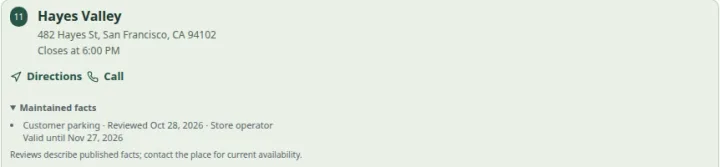
Review one published fact with its date and expiry. Changed or expired facts lose their confidence summary. Actual product · Fictional project data.
What this setup includes
- Location-specific service filters
- Maintained practical facts
- Configured next-step links
Example networks
- Studios & salons
- Repair networks
- Showrooms
- Libraries & leisure
“Where can I get a fitting, and how do I contact that branch?”
A service assignment identifies the branches offering fitting. Location details explain facilities and hours. A configured action can lead to the branch’s existing contact or booking page, where appointment availability is handled.
Information behind the answer
- Service identity
- A consistent name and useful description
- Location assignment
- The branches that provide the service
- Completion route
- The actual contact, booking or information destination
Who uses this setup.
Service owners
Define meaningful service names and the branches that offer them.
Local teams
Review facilities, contact details and the configured next step.
Visitors with a task
Narrow the options and check whether the place suits their needs.
Choose filters from actual visitor questions.
Use a small set of meaningful service and public-attribute filters. Review the facilities a visitor relies on, and keep unknown facts distinct from a confirmed yes or no. Team profiles can add context when the information is appropriate for public use.
- Assign services explicitly instead of relying on a branch name.
- Use clear descriptions and appropriately consented profiles.
- Keep opening hours separate from individual staff or appointment schedules.
Verify the handoff.
The next action should continue the task at the right branch. Check that contact and booking links reach the intended destination and describe what the customer can expect there. Displaying a service does not confirm eligibility or a reservation.
- Test external destinations on a narrow screen.
- Review specialist credentials and eligibility requirements separately.
- Validate the whole task with the audience that will use it.
Your starting plan.
Define
Agree service names, descriptions and the facts needed for a useful choice.
Assign
Map services and facilities to locations, then review public content.
Complete
Follow search through to the correct contact or external booking destination.
Before you begin.
Can users filter by service and facilities together?
The app supports service-oriented discovery and configured public facets. The facts must be explicitly modeled and maintained for the relevant locations.
Does “open” mean an appointment is available?
No. Location opening hours do not establish appointment, practitioner or seat availability.
Can this replace a specialist case-management system?
The directory helps people discover public information and contact routes. Sensitive case handling, eligibility decisions and live capacity require a separate system and review.