The right service.
At a place that suits the visit.
Help people find a location offering the right service, check practical details and follow a configured next step.

See maintained facts in the product
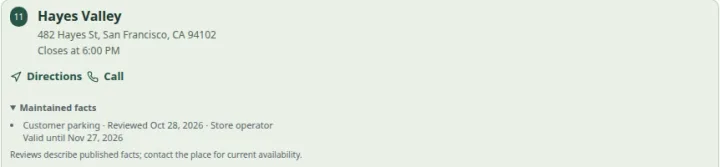 Open capture
Review one published fact with its date and expiry. Changed or expired facts lose their confidence summary. Actual product · Fictional project data.
What this setup includes
- Service-specific discovery
- Maintained public location facts
- Links to existing booking systems
Example networks
- Repair networks
- Salons & studios
- Fitness & leisure
- Pet care
- Fitting services
- Specialist retail
“Which nearby bike shop offers fitting and has a step-free entrance?”
Assign the fitting service to the right locations and maintain the entrance information as a reviewed fact. The customer can narrow the list, inspect the service and follow the shop’s configured contact or booking route.
Information behind the answer
- Service
- A named service assigned to this branch
- Facilities
- Explicit yes, no or unknown facts in the working data
- Booking
- A separately configured external destination
Who uses this setup.
Service-network managers
Keep the offered services and local information accurate across branches.
Branch teams
Maintain public service descriptions and appropriate contact or booking destinations.
People seeking a service
Find the capability they need and check the practical details of a visit.
Treat services as local capabilities.
A service directory can represent what each branch offers without forcing it into a product inventory model. Add descriptions and eligible team profiles where useful, and choose the public filters that help someone make a decision.
- Keep service availability by branch distinct from staff information.
- Use public attributes and reviewed facilities for visit requirements.
- Publish profile information only with the appropriate consent.
Make the next step clear.
A booking link can take a customer to your existing scheduling provider. Displayed hours describe the location’s opening schedule; they do not establish that a practitioner or appointment slot is available.
- Use a clear call, contact or booking action.
- Check the external destination for each branch.
- Discuss live scheduling, eligibility or specialist credential checks separately.
Your starting plan.
List the services
Use consistent service names and decide which distinctions are important to customers.
Assign and review
Map services to branches, review facilities and add appropriate photographs or profiles.
Follow the whole journey
Search, inspect the service and verify the external contact or booking destination.
Before you begin.
Is this an appointment-booking system?
No. LocatorStudio can display services and link to configured booking destinations. Live slots, reservations and appointment confirmation belong to the connected scheduling service.
Can the same service appear at several locations?
Yes. Services can be assigned to relevant branches, so a customer can find where a capability is offered.
Can I show accessibility information?
The app supports reviewed facilities and public attributes. Specific access needs require explicit, maintained facts; a general label should not imply every requirement is met.