Find the place.
Understand how to use it.
Bring services, facilities and maintained visit details together, so residents can choose a useful place to start.

See maintained facts in the product
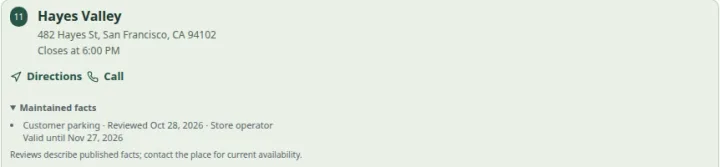 Open capture
Review one published fact with its date and expiry. Changed or expired facts lose their confidence summary. Actual product · Fictional project data.
What this setup includes
- Published services and facilities
- Field-specific review and expiry
- Useful contact and visit details
Example networks
- Library networks
- Leisure centers
- Adult learning
- Community hubs
- Repair & reuse
- Cultural venues
“Which library has a study area, a step-free entrance and Saturday hours?”
Define the study facility and relevant access facts explicitly, maintain the branch’s hours and provide its contact information. Public filters can narrow the directory using the information your team has reviewed.
Information behind the answer
- Public offering
- A named service, activity or maintained facility
- Visit information
- Address, timezone, hours and date exceptions
- Further questions
- A clear contact route to the responsible organization
Who uses this setup.
Service coordinators
Keep the public directory understandable across locations and programs.
Local teams
Review facilities, opening exceptions and contact information for the places they maintain.
Residents and visitors
Find a relevant service and check the practical conditions for using it.
Make the directory specific enough to help.
Use a small set of meaningful filters: the service being sought, the facilities needed and the location. Public attributes can describe additional facts, while unknown information remains a reason to check with the provider.
- Use plain service names and explain unfamiliar terms.
- Record facilities as explicit facts, with appropriate review.
- Provide photos and contact details that help someone prepare.
Agree who maintains the information.
A useful directory depends on a practical review process. Assign responsibility for hours, temporary changes and service descriptions, then verify the intended public or restricted audience for the published experience.
- Keep private operational notes out of public content.
- Review changes before publishing the selected release.
- Treat live capacity, case management and sensitive eligibility decisions as separate requirements.
Your starting plan.
Start with resident questions
Choose the tasks the directory should answer and the facts needed for each one.
Assign ownership
Identify who supplies and reviews information for each location or service.
Test practical access
Check search, reading, contact and navigation with the intended audience and devices.
Before you begin.
Can this represent public services rather than shops?
The location, service and public-attribute models can describe libraries, activities and community places. Specialist eligibility or case-management workflows require separate assessment.
Does a listed service have current capacity?
A service listing describes an offering. It does not establish live seat, appointment, accommodation or support capacity.
Is the resulting directory certified accessible?
The product has accessibility-focused controls and tested interactions, but a specific directory needs its own content and assistive-technology assessment. No certification is implied.