Keep the details useful.
Give changes a clear path.
Keep changing locations and hours consistent through stable identity, field ownership and reviewed publication.
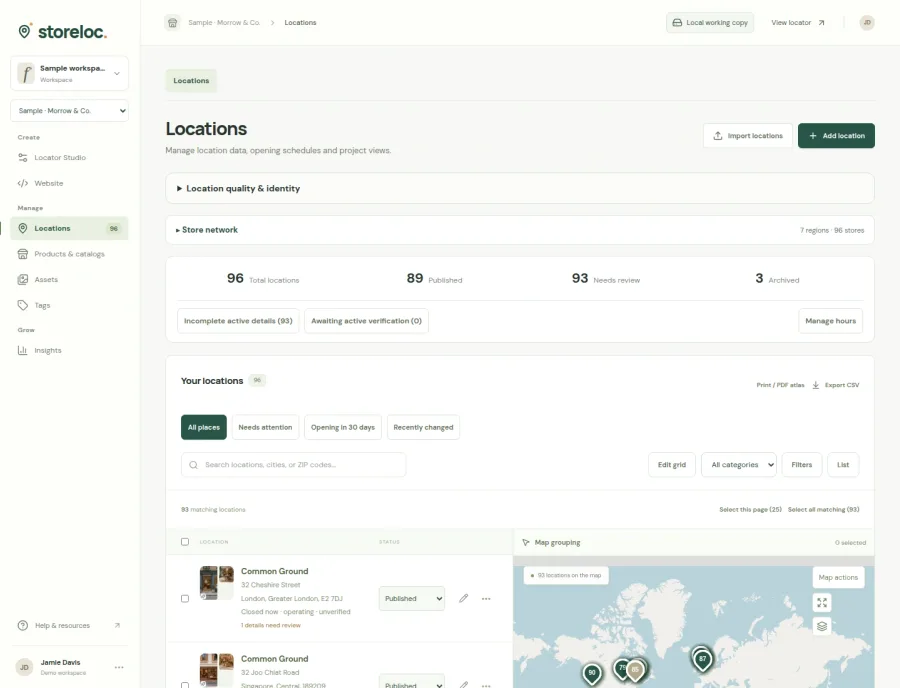
See reviewed publication in the product
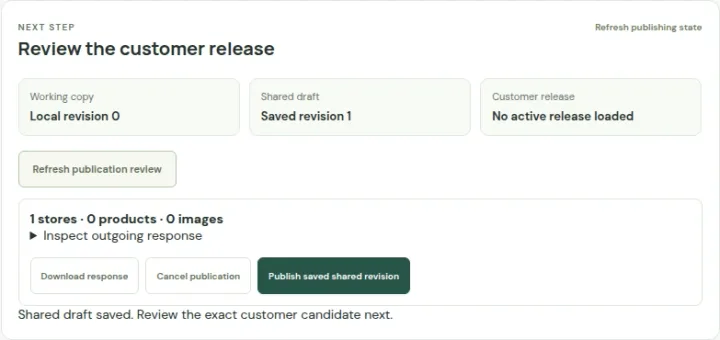 Open capture
Save the shared draft, inspect the customer view and publish explicitly. A save alone does not publish. Actual product · Fictional project data.
What this setup includes
- Reviewed spreadsheet changes
- Named source and field ownership
- Separate shared saves and publication
Example networks
- Retail operations
- Wholesale networks
- Franchises
- Community directories
- Agency clients
“The new spreadsheet changes twelve addresses. What will actually happen?”
Use stable location identities and explicit import mappings to review the affected records. Decide how blanks and protected fields behave, inspect geography changes and resolve errors before applying the operation. A reviewed import is separate from publishing its result.
Information behind the answer
- Stable identity
- Location ID and, where relevant, source identity
- Ownership
- The source or operator responsible for a field
- Review
- Exact changed records, conflicts and validation findings
Who uses this setup.
Data administrators
Map incoming fields, reconcile identities and review the exact proposed changes.
Local operators
Supply current hours and correct the details they are responsible for.
Publishing owners
Check the audience and customer-visible information before release.
Agree the source of truth field by field.
A central feed may own addresses while local teams maintain hours or photographs. Record those responsibilities and decide what an empty cell means. Review duplicate identities and source conflicts before a new import can overwrite the wrong record.
- Use reviewed CSV or supported XLSX mappings.
- Inspect blank-value policy and geographic changes.
- Keep temporary hours exceptions distinct from ordinary weekly schedules.
Make saved and published states understandable.
A browser-local working copy, a saved shared project and a customer release serve different purposes. Choose the authoritative workflow and rehearse both an ordinary update and a recovery operation with the people who will maintain the network.
- Review target, scope and changes before applying bulk operations.
- Keep a backup and a practical restore procedure.
- Configure source credentials and recurring execution separately from manual imports.
Your starting plan.
Map and preview
Identify records and inspect the proposed field changes before applying them.
Resolve and save
Review conflicts, geography, missing information and the intended shared target.
Publish and verify
Review customer-visible output and test the actual destination and audience.
Before you begin.
Can I connect a spreadsheet or CRM?
Google Sheets, Airtable and HubSpot location-read adapters exist, alongside reviewed imports. Each connection needs its own credentials, mappings and operational setup.
Does a connection automatically run continuously?
No continuous operation is assumed. Recurring maintenance requires configured credentials, an enabled supported runner and an authorized invocation arrangement.
Can a bulk update be reviewed first?
Reviewed import and bulk-operation flows expose their proposed scope. Backup, history and exact recovery capabilities have their own limits and should be rehearsed against your project.