Find the showroom.
See what makes the trip worthwhile.
Find dealers by collection and service, with the details customers need before a showroom visit.

See customer tasks in the product
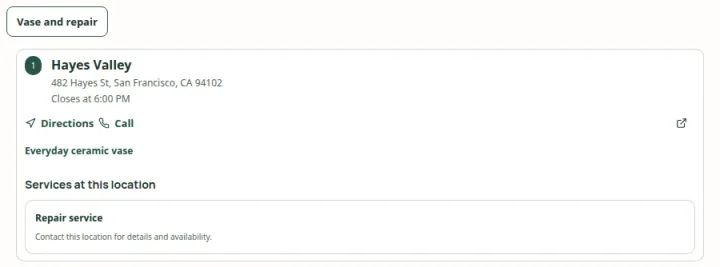 Open capture
Offer a named product or service task, then show the places that match its exact criteria. Actual product · Fictional project data.
What this setup includes
- Collection and service filters
- Showroom photos and details
- Configured contact destinations
Example networks
- Furniture & lighting
- Kitchens & bathrooms
- Building materials
- Cycling
- Audio & electronics
- Equipment dealers
“Where can I see this lighting collection and ask about installation?”
Define a display collection separately from other merchandise, assign it to the appropriate showroom and describe the consultation or installation service. Let the customer inspect the location and contact the dealer to confirm their visit.
Information behind the answer
- Display range
- An explicitly maintained showroom catalog
- Specialist services
- Consultation, fitting, repair or installation
- Next step
- A phone number, website or configured booking link
Who uses this setup.
Dealer-network managers
Organize supported brands, collections and relationships across independent locations.
Showroom teams
Make local services, photographs and contact routes useful to a prospective visitor.
Customers planning a visit
Check the relevant range and services before committing to a longer journey.
Give the dealer relationship meaning.
Use brand and carrying relationships to explain which locations belong in a product search. Add services and public attributes for the distinctions that matter to your customers, instead of presenting every dealer as interchangeable.
- Separate a display collection from the broader range a dealer can order.
- Assign consultation and repair services to the locations that provide them.
- Add clear photographs, opening hours and contact details.
Support a considered purchase.
Customers researching a larger purchase need context. Store details, comparison and product presentation can help them narrow the options; the dealer’s existing website or booking destination can handle the next conversation.
- Keep a stated service distinct from an available appointment.
- Confirm current displays with the dealer when that detail is essential.
- Discuss specialist credentials or service-area matching as separate requirements.
Your starting plan.
Define the distinctions
Agree which brands, display collections and services should affect a customer’s choice.
Map them to dealers
Review each location’s catalog, service assignments and public information.
Test a real question
Find a named range, inspect a relevant showroom and check the contact destination.
Before you begin.
Can I distinguish products on display from products sold?
Use an explicitly named display catalog or maintained public attributes. The distinction needs to be present in your data; it is not inferred from a carrying relationship.
Can customers book a consultation?
A location can link to its configured booking destination. LocatorStudio does not itself provide a live appointment scheduler.
Can dealers contribute updates?
The app includes scoped contributor and reviewed change workflows. Account access, responsibility and publication need to be agreed during setup.