One familiar brand.
Useful details at every branch.
Keep branch-specific hours, facilities and services useful, with a reviewed process for local updates.

See reviewed publication in the product
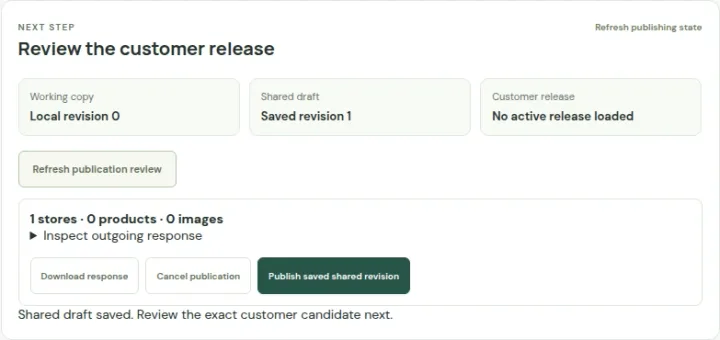 Open capture
Save the shared draft, inspect the customer view and publish explicitly. A save alone does not publish. Actual product · Fictional project data.
What this setup includes
- Branch-specific hours and services
- Reviewed local contributions
- A clear draft-to-release workflow
Example networks
- Specialty retail
- Convenience networks
- Telecom stores
- Department stores
- Charity shops
- Franchise operators
“Which branch offers repairs and is open this afternoon?”
Make repair services specific to the branch, maintain weekly hours and date exceptions, and show relevant facilities beside contact information. Customers can inspect a location instead of guessing that all branches offer the same experience.
Information behind the answer
- Branch identity
- Stable location identifier and reviewed address
- Local differences
- Services, facilities and store-specific catalogs
- Hours
- Weekly schedule, timezone and date exceptions
Who uses this setup.
Retail operations
Review branch information, resolve exceptions and coordinate updates across the network.
Regional and branch teams
Supply local hours, photographs and service changes within an agreed responsibility model.
Customers nearby
Find a suitable branch and understand what to expect when they arrive.
Keep consistency without losing local detail.
Start with shared presentation and a common location structure. Use branch-level hours, imagery, services and public facts to explain the differences that matter to a visit.
- Review mapped CSV or supported XLSX imports.
- Use scoped bulk operations and reusable hours templates.
- Keep unknown information distinct from unavailable services.
Make updates a reviewed operation.
Local working data, a saved shared project and a published release have different roles. Decide who prepares changes, who reviews them and which destination customers use, so the operational process matches the website.
- Review the exact target and changes before applying an update.
- Keep a recovery and backup process for the authoritative data.
- Configure and verify connected sources separately from a manual import.
Your starting plan.
Agree the source of truth
Choose stable branch IDs, field ownership and a person responsible for exceptions.
Review local details
Check addresses, map pins, hours, facilities and branch-specific services.
Verify the customer destination
Review the release and test the actual audience and website installation.
Before you begin.
Can I update many branches at once?
The app includes reviewed imports, bulk location operations and multi-store hours workflows. Exact supported fields and source rules should be checked against your data.
Will a local edit instantly change the public website?
Local drafts and saved shared content are distinct. Customer-facing releases require the intended save, review and publication process; continuous local-to-shared synchronization is not assumed.
Can each franchise manage its own information?
Scoped contributor capabilities exist. Invitations, offboarding, publication responsibility and the intended access model need an explicit operational review.