Your products.
The right places to find them.
Help shoppers find the right stockist, inspect its collection and choose their next step.

See customer tasks in the product
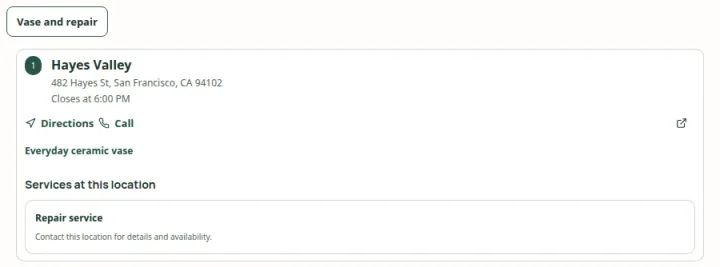 Open capture
Offer a named product or service task, then show the places that match its exact criteria. Actual product · Fictional project data.
What this setup includes
- Product and stockist tasks
- Store-specific collections
- Reviewed customer releases
Example networks
- Beauty & skincare
- Food & drink
- Fashion & footwear
- Outdoor equipment
- Homeware
- Pet products
“Which nearby shop carries the coffee blend I am looking for?”
A useful answer combines the selected product with that shop’s assigned collection, address, hours and contact details. An assortment tells the shopper what a store carries; a fresh inventory observation is a separate fact.
Information behind the answer
- Product
- A named blend or product family
- Store assortment
- The collection assigned to this stockist
- Visit details
- Address, opening hours and store contact
Who uses this setup.
Wholesale teams
Keep carrying relationships and stockist details aligned with the network you actually support.
Ecommerce teams
Offer a useful local route from a product page, alongside your existing online channels.
Shoppers
Choose a product, compare relevant stores and check the details before setting off.
Make the assortment specific to the store.
One stockist may carry a complete range while another carries a seasonal edit. Assign products and catalogs to the appropriate locations, and give customers product and brand filters that reflect those relationships.
- Use product photos and descriptions to make the range recognizable.
- Keep brand relationships separate from freeform merchandising tags.
- Use available product-family choices to help people explore related variants.
Keep the buying options understandable.
Show the information needed for a visit and link to configured store or online destinations. A catalog assignment is useful discovery information, but it is not a promise that an item is on the shelf at this moment.
- Review location data before publishing customer content.
- Connect an inventory source separately if fresh stock observations are needed.
- Choose the intended audience and installation method before sharing a locator.
Your starting plan.
Prepare the network
Start with stockists, product identifiers, carrying relationships and a location-to-assortment mapping.
Shape discovery
Choose useful product filters, store details and a presentation that fits your website.
Review the release
Check assignments and customer-visible information, then verify the selected published destination.
Before you begin.
Can different shops show different products?
Yes. Store-specific catalog and product assignments support different assortments within the same locator.
Does carrying a product mean it is in stock?
No. Carrying relationships and fresh inventory observations are separate. A live stock source needs its own integration and freshness policy.
Can this work for a small brand?
The same model can represent a small curated stockist list. Review your location count, data source and installation requirements when planning the setup.