Here for a while.
Easy to find while it matters.
Give seasonal places a clear destination, useful date information and a reviewed update process.
See reviewed publication in the product
 Open capture
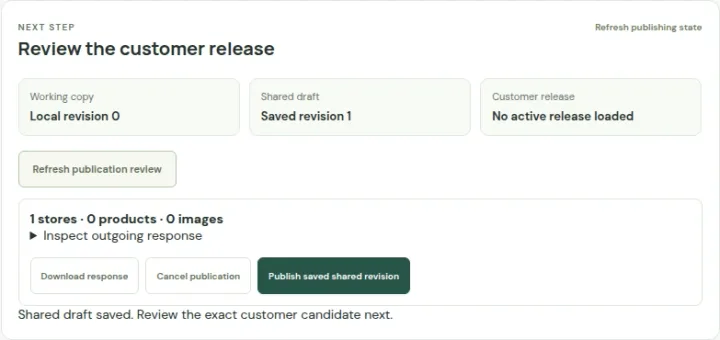
Save the shared draft, inspect the customer view and publish explicitly. A save alone does not publish. Actual product · Fictional project data.
What this setup includes
- Scheduled places and date exceptions
- Planned-visit discovery
- Reviewed seasonal updates
Example networks
- Pop-up retail
- Farmers markets
- Craft fairs
- Brand activations
- Seasonal venues
- Collection campaigns
“Where can I try this brand at a participating shop this weekend?”
Maintain the participating locations and their date-specific hours, then associate the campaign with the appropriate destinations. Keep the event description, store contact and any external booking or purchase route clear.
Information behind the answer
- Participation
- An explicit set of campaign locations
- Timing
- Reviewed event dates and location hours
- Destination
- A specific store, campaign page or external action
Who uses this setup.
Campaign and event teams
Coordinate dates, participating places and the relevant visitor action.
Local hosts and vendors
Supply accurate destination information and flag schedule changes.
Visitors
Check where the activity happens, when it is offered and how to find it.
Keep place and campaign information connected.
A campaign can highlight selected places without replacing their normal details. Maintain the underlying location, date exceptions and relevant product or service assignments so the visitor can inspect what the event means at that destination.
- Use explicit campaign dates and participating locations.
- Prepare temporary opening schedules and exceptions.
- Keep the event’s action distinct from an ordinary directions click.
Plan the end as carefully as the launch.
Temporary content needs review when schedules change or an activity finishes. Agree how the team updates the saved data and published destination, and check that the next visitor sees the intended current information.
- Review expiry and lifecycle settings for the chosen experience.
- Use managed links and QR codes where their access model suits the campaign.
- Discuss live moving locations, ticketing and route planning separately.
Your starting plan.
Define the window
Record where the activity happens, its dates and the person responsible for changes.
Prepare the destinations
Review participating places, hours, content and the customer action.
Check both dates
Inspect the experience during the activity and after its intended expiry.
Before you begin.
Can temporary places have different hours?
Locations support weekly schedules and date exceptions. Temporary opening and lifecycle information must be explicitly maintained and reviewed.
Does this provide live food-truck tracking?
No live moving-location feed is assumed. A scheduled stop list is different from continuously reported vehicle positions.
Can I sell tickets or reserve a place?
Link to an appropriate configured external destination. Ticket inventory, payments and reservations require their own systems.